What it looks like
The Overview and Calendar sheets
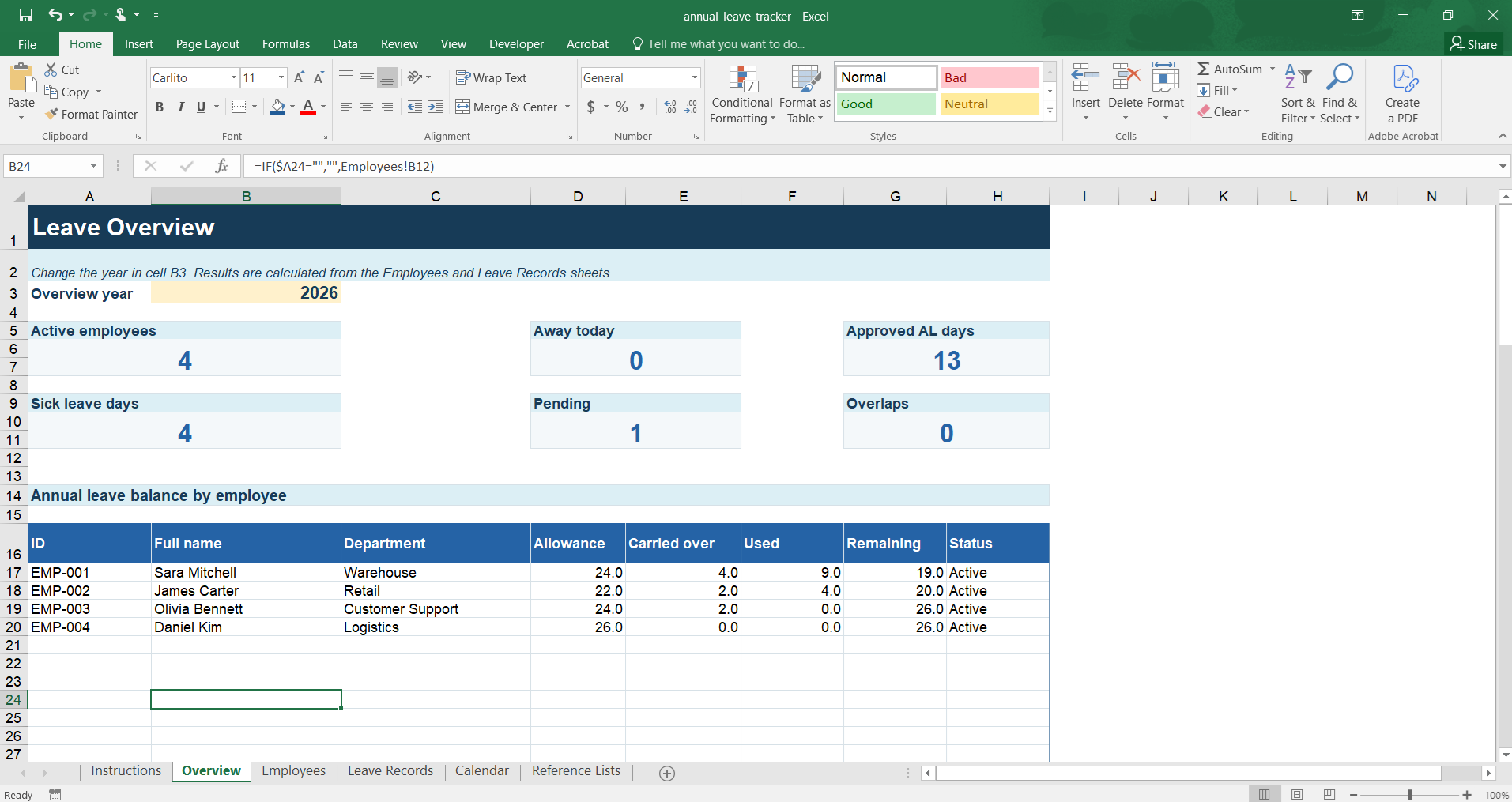
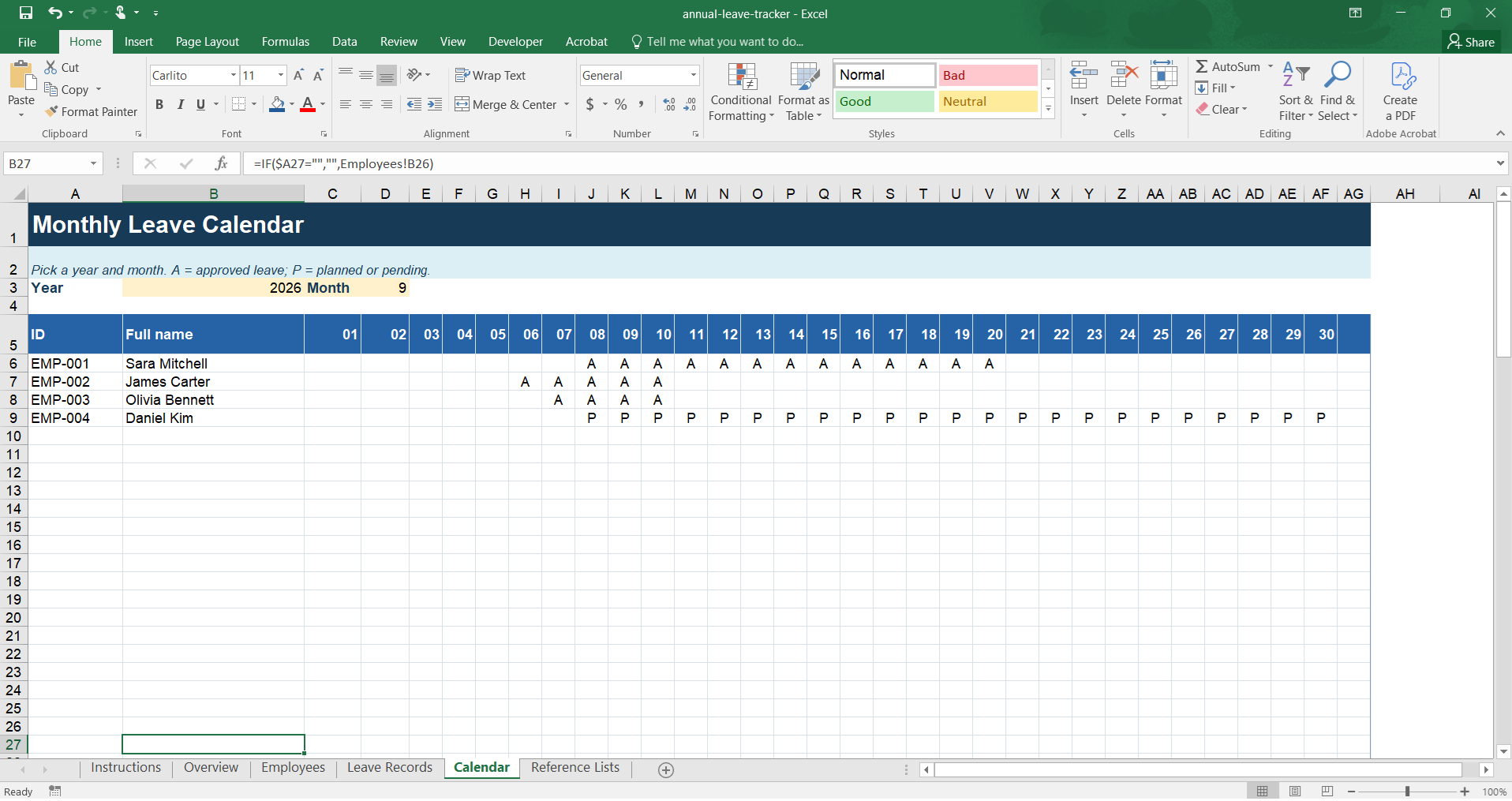
Track annual leave, sick leave, and other employee absences in a single document. The tracker automatically calculates working days, used and remaining annual leave, shows pending requests, and flags overlapping periods for the same employee.
Download the free Excel tracker.xlsx file · no sign-up · Microsoft Excel · easy to customize
Download started.
The tracker will help you keep records, but approvals still happen by hand. If requests come in over chat and email, and several managers approve them, take two minutes to check how much of that Atendo can take off your hands.
Check your processInstead of separate lists for annual leave, sick leave, and days off, every absence runs through one shared record. The default reference list includes:
Leave types and their codes can be renamed to match your company's terminology and policies.
Based on the start and end date, the tracker calculates the number of working days, excluding Saturdays, Sundays, and any dates you add to the non-working-days and holidays list.
For every employee, it shows the annual allowance, carried-over days, approved and used days, and the current balance.
The overview shows how many employees are away today, based on approved periods.
Every entry can carry a status of Planned, Pending, Approved, or Rejected, so unconfirmed requests don't get mixed in with the final record.
If the same employee has two leave periods that overlap in time, the tracker flags the entry for review.
A short explanation of the workflow and the template's key rules.
Number of active employees, away today, approved annual leave days, sick leave days, pending requests, and possible overlaps, plus the annual leave balance per employee.
Master employee list with department, location, annual allowance, carried-over, used, and remaining days.
The central table of all requests and leave periods: employee, type, dates, status, working days, approver, and note.
A monthly view of employees and leave days. Pick the year and month at the top of the sheet.
Customizable leave types, statuses, and non-working dates excluded from the calculations.
Set up your reference lists — enter non-working days and holidays, then customize the leave types to match your company's terminology if needed.
Add employees and annual allowances — give each employee a unique ID, department, location, annual allowance, and number of carried-over days.
Log a request or leave period — on the "Leave Records" sheet, choose the employee, leave type, start and end date, and request status. Name, working days, and year fill in automatically.
Check the balance — the "Overview" sheet shows the summary and annual leave balance per employee. The monthly calendar helps you spot overlapping absences.
The tracker is free and requires no sign-up. Data-entry fields are kept separate from the automatic calculations, and the reference lists can be extended to fit your company's needs.
Download the Excel annual leave tracker (.xlsx)This template is an organizational tool. It does not determine an employee's statutory entitlement and does not replace internal policy, employer decisions, or professional legal and accounting advice.
A spreadsheet can work well for a company with a small headcount, a simple approval process, and one person responsible for keeping the record up to date. Problems usually start once several managers approve leave, employees send requests over chat and email, different locations keep different versions of the document, changes have no reliable trail, or the sheet holds personal and health data that shouldn't be open to everyone.
At that point the tracker stops being just a record. It becomes an extra process that someone has to keep policing.
Atendo connects leave requests to employees, shifts, attendance, and team staffing levels. An employee can submit a request, the responsible person can review it within their authority, and approved leave flows into a shared overview without copying data between documents:
Yes. You can download and use the .xlsx file with no sign-up.
Yes. Sick leave is one of the default leave types. You can add other types your company uses.
Not in the default setup. The formula excludes Saturdays and Sundays, plus any dates you add to the non-working-days list. If your company runs a different work week, adjust the formula to match.
Enter holiday and other non-working dates on the "Reference Lists" sheet. They're then excluded from the automatic working-days calculation.
No. The annual allowance and carried-over days are entered by the person responsible, based on applicable law, internal policy, and the employee's specific status.
The file can be placed on shared storage, but concurrent editing, access rights, and change history depend on the service it's stored on. For a more complex process with multiple approvers, dedicated software is a better fit.
Yes. The tracker flags an overlap between two periods for the same employee. The monthly calendar helps you spot at a glance when several employees are away at the same time.
No. It's an organizational tool for internal record-keeping and does not constitute legal advice or replace the documentation an employer must keep under applicable law.